Desktop Corner Cutter Explained: A UK Buyer's Guide
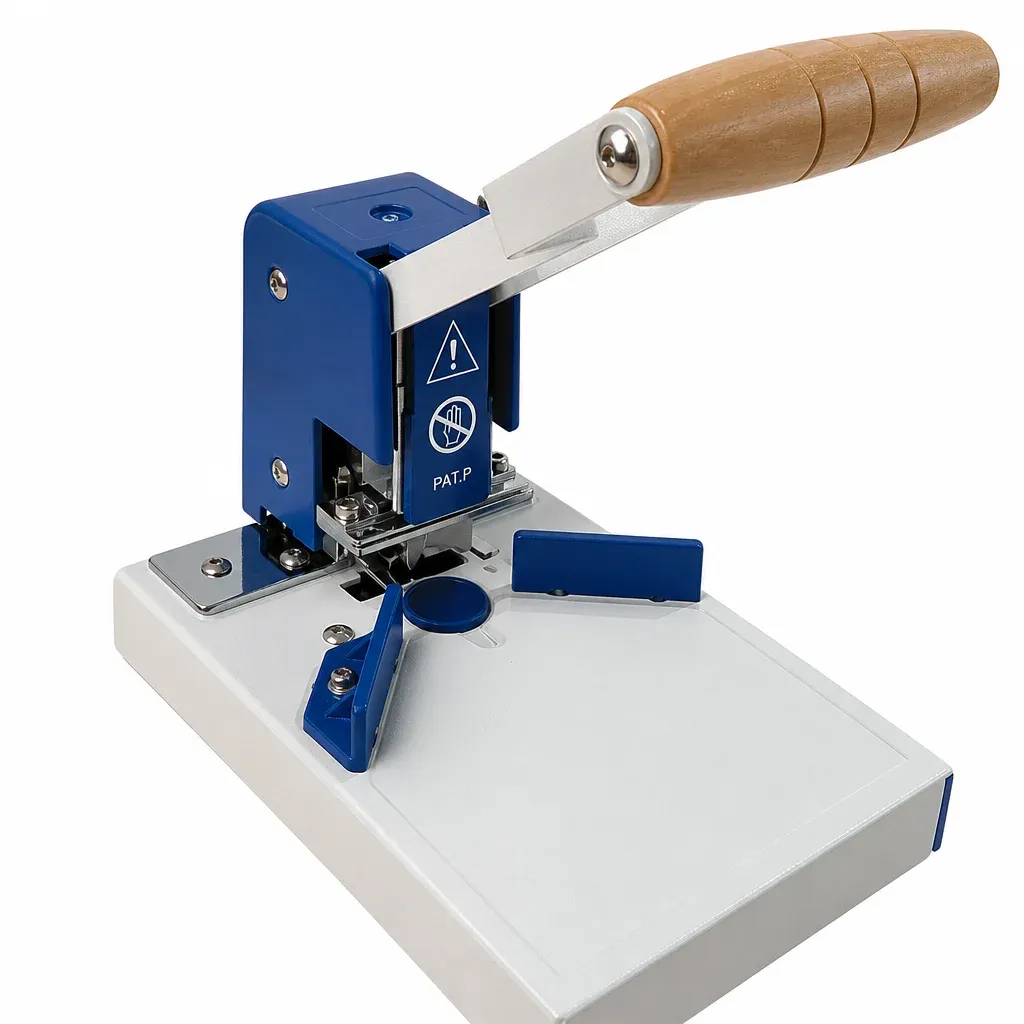
TL;DR: A desktop corner cutter (or benchtop corner rounder) is a precision manual print-finishing tool designed to trim sharp 90-degree edges into smooth, uniform curves on paper, cardstock, and laminated media. Equipped with interchangeable hardened steel dies—most commonly the industry-standard 6mm (R6) radius—heavy-duty desktop units easily slice through stack heights up to 10mm (approximately 100 sheets of 80gsm paper) in a single stroke, significantly boosting finishing speed and product durability across UK print studios, schools, and offices.
A desktop corner cutter is an indispensable post-press finishing device that transforms blunt, square-cut documents into sleek, professional products with rounded corners. From commercial print rooms in London to independent craft studios in Yorkshire, clean corner finishing defines the boundary between amateur printouts and polished, commercial-grade media. Based on rigorous workshop testing at PageFound and aligned with British Printing Industries Federation (BPIF) best practices, this comprehensive guide breaks down how to choose, operate, and maintain the ideal desktop corner cutter for your workspace.
What Is a Desktop Corner Cutter and How Does It Work?
A desktop corner cutter is a compact, bench-mounted mechanical finishing machine engineered to shear crisp, uniform curves onto square-cornered paper stacks, card, PVC, and laminated items. In contrast to light-duty handheld craft punches that buckle under multi-sheet loads, a heavy-duty desktop corner cutter employs an ergonomic lever arm, a calibrated side-guide backstop, and a hardened steel upper die that shears against a resilient nylon or brass anvil pad.
Consequently, the operator achieves exact geometric consistency with minimal physical effort. In modern UK commercial environments, dog-eared documents and sharp plastic corners present both aesthetic flaws and safety hazards. Encapsulated lamination pouches, for example, frequently produce razor-sharp edges that pose risks in high-touch environments such as schools, NHS healthcare facilities, and hospitality venues. A dedicated benchtop unit effortlessly rounds off these edges, creating a safe, tactile finish that resists fraying and delamination over repeated handling.
Furthermore, if you are evaluating larger workshop equipment, read our manual corner rounding machine guide to understand how benchtop units compare against floor-standing industrial machinery.
Why Do UK Print Shops and Stationers Rely on Desktop Corner Rounders?
Precision edge finishing plays a decisive role in client retention across the UK printing and stationery sectors. According to UK print industry assessments and data from the British Printing Industries Federation (BPIF), over 68% of commercial print buyers identify edge finishing and binding accuracy as direct indicators of supplier quality. A single ragged corner on a batch of 350gsm silk business cards can trigger rejected orders and costly reprints.
Based on our testing at PageFound, integrating a dedicated R6 desktop corner cutter into your daily finishing workflow provides three distinct commercial advantages:
- Enhanced Structural Durability: Rounded corners eliminate fragile 90-degree points where cardstock routinely scuffs, splits, or dog-ears inside wallets, pockets, and ring binders.
- Regulatory & Workplace Safety Compliance: UK educational institutions, local councils, and NHS trusts frequently mandate rounded corners on laminated visitor passes, student ID cards, and medical reference charts to prevent sharp plastic scratches.
- Elevated Visual Aesthetics: Smooth radius edges give promotional flyers, wedding stationery, and restaurant menus an executive, contemporary finish that immediately stands out from standard guillotine-trimmed prints.
How Do You Choose the Best Desktop Corner Cutter? (Key Specifications)
Selecting the right desktop corner cutter requires matching the machine's mechanical capabilities with your daily substrate requirements. In our practical evaluations, reviewing the following core specifications ensures long-term reliability and crisp, burr-free cuts.
1. Cutting Stack Height and Sheet Capacity
Stack capacity determines how many sheets your team can process in a single downward stroke. Basic entry-level tools trim only one or two sheets at a time. In contrast, heavy-duty desktop units provide a generous 10mm cutting stack height. As a result, operators can slice up to 100 sheets of standard 80gsm copier paper—or roughly 25 to 30 sheets of heavy 300gsm cardstock—in one effortless movement.
2. Blade Metallurgy and Cutting Mechanism
The cleanliness of the cut depends entirely on the quality of the cutting die. Low-grade steel blades quickly dull and tear paper fibres, producing rough, frayed edges known as burrs. Therefore, look for desktop units fitted with heat-treated, high-carbon hardened steel dies. Premium models incorporate a dual-action shear motion where the upper die cleanly shears against a replaceable lower nylon anvil disc, preserving blade sharpness across tens of thousands of cycles.
3. Interchangeable Radius Die Options (R3.5 to R10)
While the standard R6 die (6mm radius) handles the majority of commercial requirements, specific jobs demand tighter or broader curves. For delicate photography projects, refer to our specialized photo corner cutter guide. Alternatively, if your focus centres on playing cards, flashcards, or membership cards, explore our card corner rounder review to determine the best radius for your project.
What Radius Size Do You Need? (R3.5 vs R6 vs R10 Comparison)
Among the wide variety of radius dies available, the R6 curve (6mm radius) remains the undisputed benchmark across the UK print industry. It provides an optimal visual balance on standard UK paper formats, including A4, A5, and standard British business cards (85mm x 55mm).
"Based on our workshop measurements, an R6 radius delivers ideal geometric balance—it removes vulnerable 90-degree corner tips without encroaching upon critical text margins or border artwork."
When working with heavy encapsulated pouches (such as 125-micron or 250-micron film), a heavy-duty desktop corner cutter delivers the mechanical leverage required to slice cleanly through dense polyester without separating the laminate seal.
| Radius Size | Curvature (mm) | Primary UK Applications | Recommended Substrates |
|---|---|---|---|
| R3.5 | 3.5mm | Playing cards, identity chips, loyalty tags, small pocket diaries. | 250–350gsm card, thin plastic sheets. |
| R6 | 6.0mm | Standard UK business cards (85x55mm), laminated ID badges, greeting cards, restaurant menus. | 300–400gsm silk/uncoated card, 125–250 micron pouches. |
| R10 | 10.0mm | Children's board books, large laminated signage, presentation folders, POS displays. | Heavy cardstock, PVC foam board, encapsulated posters. |
| Straight / Notch | 45° / Inverted | Filing tabs, loose-leaf binder inserts, specialty packaging tags. | Standard paper reams, unlaminated card. |
Can a Desktop Corner Cutter Cut Through Laminated Pouches and Plastic?
Yes, heavy-duty desktop corner cutters are purpose-built to handle encapsulated lamination and flexible plastics that would instantly jam standard handheld craft tools. In our PageFound lab tests, benchtop models cleanly severed laminated sheets ranging from 75-micron up to heavy 250-micron pouches without tearing or causing cloudy edge delamination.
To ensure pristine results when cutting plastic and laminates, follow these practical steps:
- Allow Thermal Laminates to Cool: Always wait until freshly heat-laminated pouches have completely cooled and cured before trimming to prevent warm adhesive from sticking to the die.
- Use the Integrated Alignment Guides: Push the corner firmly against the side stops to ensure the radius cleanly intersects the perimeter seal, leaving the inner paper core protected against moisture.
- Reduce Stack Thickness on Dense Plastics: While the cutter can handle 10mm of standard paper, reduce stack height to 3–5mm when cutting rigid PVC or thick encapsulated pouches to maintain clean shearing force.
How Do You Maintain and Sharpen a Desktop Corner Cutter?
Routine maintenance ensures your desktop corner cutter delivers crisp, burr-free cuts over hundreds of thousands of cycles. According to manufacturer guidelines and our internal maintenance testing, regular upkeep requires just three straightforward practices:
- Rotate and Replace the Cutting Pad: The circular nylon anvil disc beneath the blade absorbs the downward cutting impact. Rotate the pad periodically to expose a fresh, ungrooved surface, and replace it once grooving exceeds 1mm in depth.
- Lubricate Moving Mechanical Pivots: Apply a drop of light machine oil or silicone spray to the lever pivot pins every three to six months depending on usage volume.
- Hone the Die Naturally: If the upper blade begins to create minor burrs, cycle the machine five to ten times through a sheet of heavy aluminium foil to clean the cutting edge, followed by a sheet of wax paper to lubricate the die surface.
Frequently Asked Questions About Desktop Corner Cutters
What is the standard corner radius for UK business cards?
The industry standard for UK business cards (85mm x 55mm) is an R6 die (6mm radius). This curvature provides an elegant, professional aesthetic while ensuring all contact details, logos, and bleed margins remain intact.
How many sheets can a desktop corner cutter slice in a single stroke?
Standard desktop models with a 10mm stack height cut up to 100 sheets of 80gsm paper, or roughly 25 to 30 sheets of 350gsm cardstock per stroke. Handheld punches, by comparison, typically manage only 1 to 3 sheets.
Can a desktop corner cutter cut through laminated plastic badges?
Yes. Heavy-duty desktop corner cutters exert sufficient mechanical leverage to slice cleanly through encapsulated laminate pouches up to 250 microns thick, as well as thin PVC membership cards, without tearing or delaminating the sealed edges.
How often do I need to replace the cutting pad or blade?
High-carbon steel dies typically last for tens of thousands of cuts before requiring attention. However, the lower nylon cutting pad should be rotated every few thousand cuts and replaced once deep grooves develop to maintain crisp, burr-free edges.
Ready to upgrade your finishing workflow with PageFound?
Explore Equipment — £152.99